Sasha skater dress: Design Options
Conditional Options
Armhole princess seam curve point
This controls where (vertically) the curve of the princess seam starts
- Type: Percentage
- Default: 20%
- Minimum: -20%
- Maximum: 90%
The armhole princess seam curve point option controls where (vertically) the curve of the princess seam starts.
Armhole princess seam curve width
This controls the radius of the curve of the princess seam
- Type: Percentage
- Default: 70%
- Minimum: 10%
- Maximum: 90%
The armhole princess seam curve width option controls the radius of the curve of the princess seam.
Princess Seam Curviness
Controls the curvature of the princess seam
- Type: Boolean
- Default: true
The armhole dart curviness option controls how curvy the princess seam is.
The first version of noble had a fairly round/curvy princess seam. This option
allows you to make a less curvy seam.
Armhole dart position
Controls the position of the armhole dart
- Type: Percentage
- Default: 50%
- Minimum: 10%
- Maximum: 90%
The Armhole Dart Position option allows you to move the position of the dart/princess seam.
Shoulder dart curvature
Controls the curvature of the upper part of the shoulder dart
- Type: Percentage
- Default: 0%
- Minimum: -5%
- Maximum: 2.5%
The Shoulder Dart Curvature option controls the curvature of the upper part of the shoulder dart.
Shoulder dart position
Controls the position of the shoulder dart
- Type: Percentage
- Default: 50%
- Minimum: 10%
- Maximum: 90%
The Shoulder Dart Position option allows you to move the position of the dart/princess seam.
Pocket opening curve
Controls the curvature of the pocket opening
- Type: Percentage
- Default: 54%
- Minimum: 0%
- Maximum: 100%
The extent to which the pocket opening is a curve (rather than a straight line).
Pocket opening Height
Controls the vertical dimension of the pocket opening
- Type: Percentage
- Default: 65%
- Minimum: 0%
- Maximum: 150%
The vertical dimension of the pocket opening, as a percentage of waist-to-hips. When set to zero, the pocket opening is a horizontal line.
Armhole
Armhole depth
Controls the depth of the armhole. Higher values make a deeper armhole.
- Type: Percentage
- Default: 44%
- Minimum: 38%
- Maximum: 46%
The armhole depth option controls the depth of the armhole.
Back armhole curvature
Controls how deep the armhole is scooped out at the back
- Type: Percentage
- Default: 63%
- Minimum: 50%
- Maximum: 85%
The back armhole curvature option controls how much the armhole is scooped at out the bottom in the back.
Back armhole pitch depth
Controls how deep the armhole cuts into the back
- Type: Percentage
- Default: 35%
- Minimum: 30%
- Maximum: 40%
The back armhole pitch depth option controls the vertical position of the armhole pitch point at the back.
Back armhole slant
Controls the slant of the armhole at the back
- Type: Degrees
- Default: 5°
- Minimum: 1°
- Maximum: 9°
The back armhole slant slightly rotates the armhole around the back pitch point.
Front armhole curvature
Controls how deep the armhole is scooped out at the front bottom
- Type: Percentage
- Default: 63%
- Minimum: 50%
- Maximum: 85%
Controls how deep the armhole is scooped out at the front bottom
Front armhole pitch depth
Controls how deep the armhole cuts into the front
- Type: Percentage
- Default: 29%
- Minimum: 27%
- Maximum: 31%
The front armhole pitch depth option controls the vertical position of the armhole pitch point at the front.
Darts
Back dart height
Controls the height of the back dart
- Type: Percentage
- Default: 46%
- Minimum: 38%
- Maximum: 54%
The back dart height option controls the height (length if you will) of the back dart.
Upper dart length
Controls the length of the upper dart
- Type: Percentage
- Default: 90%
- Minimum: 80%
- Maximum: 95%
The Upper Dart Length controls the length of the upper dart, 100% is all the way to the bust point.
Waist dart length
Controls the length of the waist dart
- Type: Percentage
- Default: 90%
- Minimum: 75%
- Maximum: 95%
The waist dart length option controls the length of the waist dart towards the bust.
Waist dart position
Controls the position of the waist ‘dart’, moving it to the center (negative) or side (positive)
- Type: Percentage
- Default: 0%
- Minimum: -50%
- Maximum: 50%
The waist dart position option controls the position of the waist ‘dart’, moving it to the center (negative) or side (positive).
Fit
Biceps ease
The amount of ease at your upper arm. Note that while we try to respect this, fitting the sleeve to the armhole takes precedence over respecting the exact amount of ease.
- Type: Percentage
- Default: 0%
- Minimum: 0%
- Maximum: 10%

The amount of ease at your upper arm.
Bust span ease
Controls the amount of ease along the bust span
- Type: Percentage
- Default: 0%
- Minimum: -5%
- Maximum: 20%
The bust span ease option controls how much ease is applied to the bust span.
This will not add ease to the garment, but merely influence the bust point.
Chest ease
Controls the amount of ease at the chest
- Type: Percentage
- Default: 11%
- Minimum: 5%
- Maximum: 20%
The chest ease option controls the amount of ease at the fullest part of your chest.
Cuff ease
The amount of ease around the wrist (or arm, for shorter sleeves)
- Type: Percentage
- Default: 20%
- Minimum: 0%
- Maximum: 200%

This option controls the ease at your wrist.
Full chest ease reduction
Allows you to independently reduce the ease around the chest to make it fit tight(er) in that area
- Type: Percentage
- Default: 4%
- Minimum: 0%
- Maximum: 8%
Allows you to independently reduce the ease around the chest to make it fit tight(er) in that area.
Shoulder to shoulder ease
Controls the amount of ease along the shoulder to shoulder measurement
- Type: Percentage
- Default: -0.5%
- Minimum: -1%
- Maximum: 5%
The Shoulder to Shoulder Ease option allows you to add ease between the shoulders.
Sleevecap ease
The amount by which the sleevecap seam is longer than the armhole seam.
- Type: Percentage
- Default: 0%
- Minimum: 0%
- Maximum: 10%
This option determines the amount of ease at the sleevecap.
The amount of sleevecap ease determines how the sleeves rolls from the shoulder. More ease makes the sleeve curl into the seam as you see on suit jackets. Less ease makes the sleeve lie flat.
For light fabric or knits, you want little to no sleevecap ease. For heavier woven fabrics, you need more sleevecap ease.
Waist ease
Controls the amount of ease at the waist
- Type: Percentage
- Default: 5%
- Minimum: 1%
- Maximum: 20%
The waist ease option controls the amount of ease at your waist.
Style
Length bonus
Increase or decrease the skirt length with respect to knee length
- Type: Percentage
- Default: -10%
- Minimum: -100%
- Maximum: 100%
This option controls the length of the skirt, relative to knee height, as a percentage of waist-to-knee distance.
Neckline bend
Change the shape of the neckline from V-neck to rounded to boxy
- Type: Percentage
- Default: 30%
- Minimum: 0%
- Maximum: 150%
This option controls the curvature of the neckline, going from a V-neck to a rounded neck to a more boxy neckline.
Neckline depth
Control the depth of the neckline
- Type: Percentage
- Default: 30%
- Minimum: 10%
- Maximum: 70%
This option controls the depth of the neckline, as a percentage of hps-to-waist (front).
Neckline width
Control the width of the neckline
- Type: Percentage
- Default: 50%
- Minimum: 10%
- Maximum: 95%
This option controls the width of the neck opening.
Skirt width bonus
Increase or decrease the additional skirt width with respect to hip circumference
- Type: Percentage
- Default: 50%
- Minimum: 0%
- Maximum: 100%
The additional skirt width due to the godets (triangular additions to the skirt panels), as a percentage of hip width.
Sleeve length bonus
The amount to lengthen the sleeve. A negative value will shorten it.
- Type: Percentage
- Default: 0%
- Minimum: -40%
- Maximum: 10%
This option controls how to lengthen the sleeves.

With pocket
Splits the front outside part to add a pocket
- Type: Boolean
- Default: true
When the pocket is enabled, the front outside is split into above and below at the pocket opening. Also, the pocket is both generated as a separate part and added to the upper front outside part.
Advanced
Armhole dart position back offset
Controls the position of the back armhole dart relative to that of the front
- Type: Percentage
- Default: 0%
- Minimum: -100%
- Maximum: 100%
This option allows the split of the back armhole to be configured separately from the front. By default, the value is zero and the back armhole is split between inside and outside using the same proportions as the front. The final proportions are clipped to always fit within the armhole.
Back neck cutout
How deep the neck is cut out at the back
- Type: Percentage
- Default: 6%
- Minimum: 3%
- Maximum: 9%
The back neck cutout option controls how far the neck opening is scooped out at the back.
Front shoulder width
Controls how much width is added to the shoulder in the front
- Type: Percentage
- Default: 95%
- Minimum: 92%
- Maximum: 98%
The front shoulder width option controls the width of the shoulders at the front, relative to the back.
High bust width
Controls the width of the high bust
- Type: Percentage
- Default: 86%
- Minimum: 80%
- Maximum: 92%
The high bust width option allows you to tweak the high bust width at the front.
Sleeve width guarantee
Controls how much of the sleeve width will be guaranteed. This determines how much we can alter the sleeve width to fit the sleeve in the armhole.
- Type: Percentage
- Default: 90%
- Minimum: 25%
- Maximum: 100%
We first draft the arm opening, then we draft a sleeve to fit it.
When all goes well, the sleeve fits perfectly, and this option is not relevant. However, if/when the sleeve does not perfectly fit the arm opening, we need to adapt it.
Since the shape and height of the sleevecap are more important than the width, we tend to prefer adjusting the width to fit the sleevecap.
To avoid the sleeve getting too narrow, we only adapt a portion of the sleeve width. This option allows you to control how much of the sleeve width is guaranteed. Increasing this option will allow us less of the width to play with to fit the sleeve. This way, the resulting sleeve will be closer to the theoretical sleeve width, and we will instead modify (more of) the sleevecap height to fit the sleeve.
Sleevecap
Sleevecap back X
Controls the placement of the sleevecap back pitchpoint on the X-axis (horizontal)
- Type: Percentage
- Default: 60%
- Minimum: 35%
- Maximum: 65%
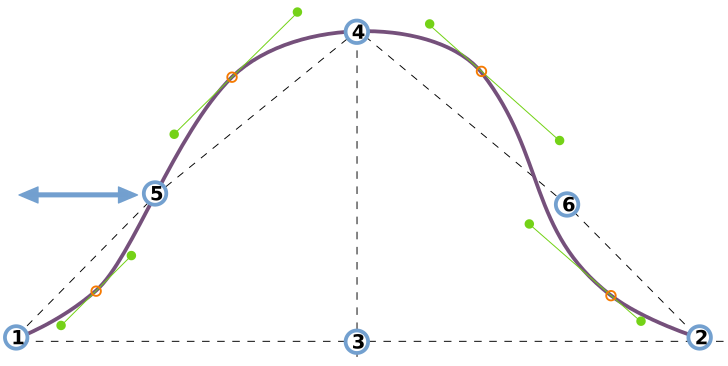
This option controls the horizontal placement of the sleevecap inflection point at the back of the sleeve.
See understanding the sleevecap for an in-depth look into how the sleevecap is constructed and the influence of the different options on its shape.
Sleevecap back Y
Controls the placement of the sleevecap back pitchpoint on the Y-axis (vertical)
- Type: Percentage
- Default: 33%
- Minimum: 30%
- Maximum: 65%
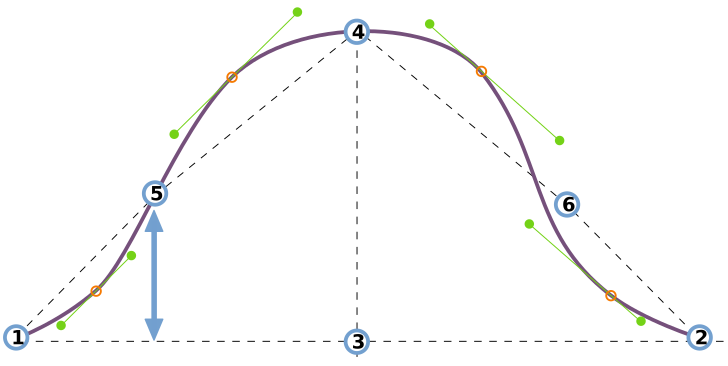
This option controls the vertical placement of the sleevecap inflection point at the back of the sleeve.
See understanding the sleevecap for an in-depth look into how the sleevecap is constructed and the influence of the different options on its shape.
Sleevecap front X
Controls the placement of the sleevecap front pitchpoint on the X-axis (horizontal)
- Type: Percentage
- Default: 55%
- Minimum: 35%
- Maximum: 65%
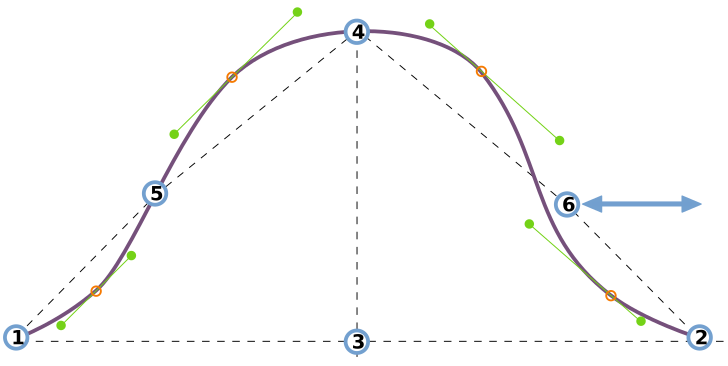
This option controls the horizontal placement of the sleevecap inflection point at the front of the sleeve.
See understanding the sleevecap for an in-depth look into how the sleevecap is constructed and the influence of the different options on its shape.
Sleevecap front Y
Controls the placement of the sleevecap front pitchpoint on the Y-axis (vertical)
- Type: Percentage
- Default: 33%
- Minimum: 30%
- Maximum: 65%
This option controls the vertical placement of the sleevecap inflection point at the front of the sleeve.
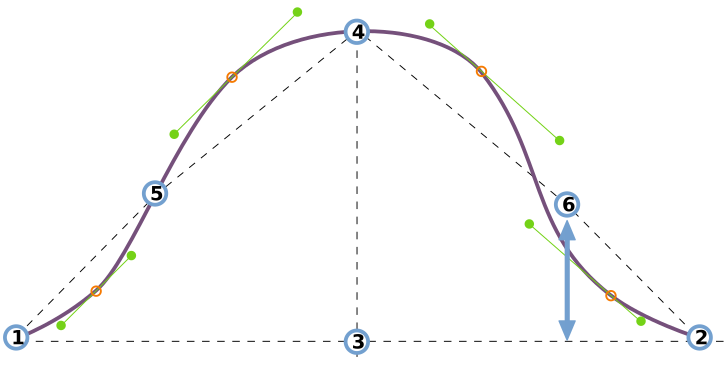
See understanding the sleevecap for an in-depth look into how the sleevecap is constructed and the influence of the different options on its shape.
Sleevecap Q1 offset
Controls the curvature of the sleevecap in the first quadrant (front armhole)
- Type: Percentage
- Default: 1.7%
- Minimum: 0%
- Maximum: 7%
This option controls the offset in the first quadrant of the sleevecap.
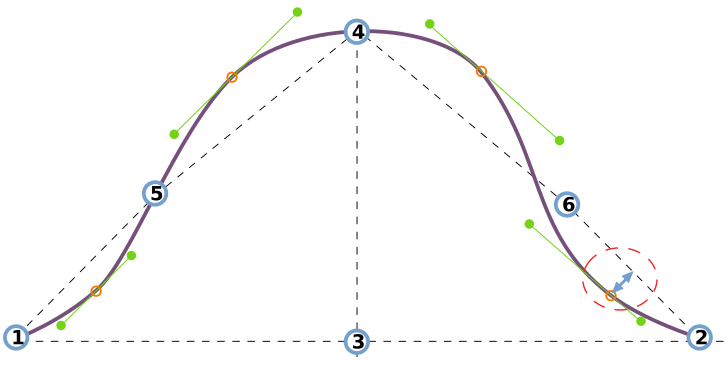
See understanding the sleevecap for an in-depth look into how the sleevecap is constructed and the influence of the different options on its shape.
Sleevecap Q1 downward spread
Controls the spread of the sleevecap first quadrant curvature towards the armhole
- Type: Percentage
- Default: 10%
- Minimum: 4%
- Maximum: 20%
This option controls the downward spread in the first quadrant of the sleevecap.
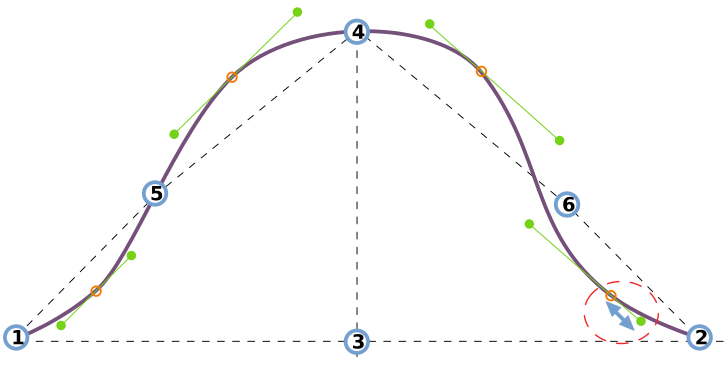
See understanding the sleevecap for an in-depth look into how the sleevecap is constructed and the influence of the different options on its shape.
Sleevecap Q1 upward spread
Controls the spread of the sleevecap first quadrant curvature towards the shoulder
- Type: Percentage
- Default: 15%
- Minimum: 4%
- Maximum: 20%
This option controls the upward spread in the first quadrant of the sleevecap.
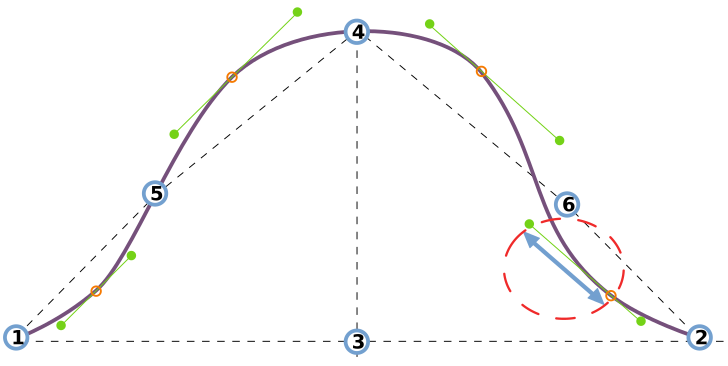
See understanding the sleevecap for an in-depth look into how the sleevecap is constructed and the influence of the different options on its shape.
Sleevecap Q2 offset
Controls the curvature of the sleevecap in the second quadrant (front shoulder)
- Type: Percentage
- Default: 3.5%
- Minimum: 0%
- Maximum: 7%
This option controls the offset in the second quadrant of the sleevecap.
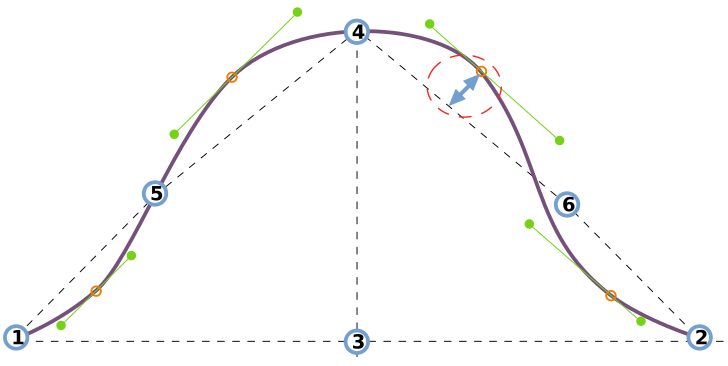
See understanding the sleevecap for an in-depth look into how the sleevecap is constructed and the influence of the different options on its shape.
Sleevecap Q2 downward spread
Controls the spread of the sleevecap second quadrant curvature towards the armhole
- Type: Percentage
- Default: 15%
- Minimum: 4%
- Maximum: 20%
This option controls the downward spread in the second quadrant of the sleevecap.
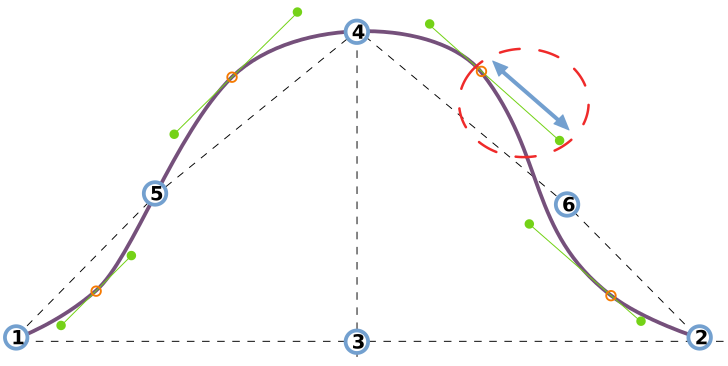
See understanding the sleevecap for an in-depth look into how the sleevecap is constructed and the influence of the different options on its shape.
Sleevecap Q2 upward spread
Controls the spread of the sleevecap second quadrant curvature towards the shoulder
- Type: Percentage
- Default: 10%
- Minimum: 4%
- Maximum: 20%
This option controls the upward spread in the second quadrant of the sleevecap.
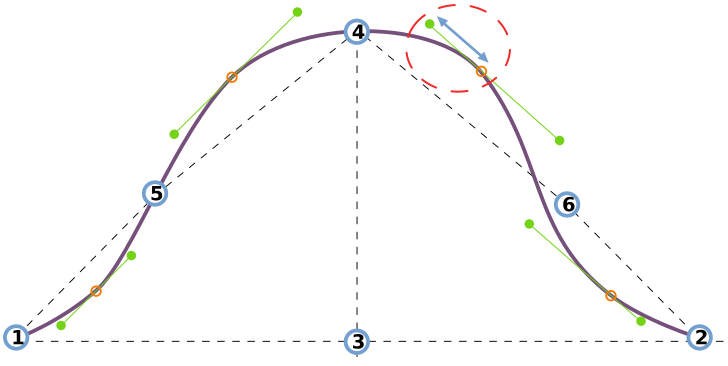
See understanding the sleevecap for an in-depth look into how the sleevecap is constructed and the influence of the different options on its shape.
Sleevecap Q3 offset
Controls the curvature of the sleevecap in the third quadrant (back shoulder)
- Type: Percentage
- Default: 2.5%
- Minimum: 0%
- Maximum: 7%
This option controls the offset in the third quadrant of the sleevecap.
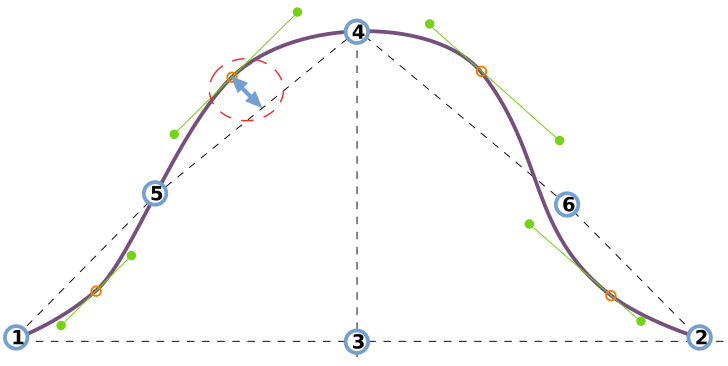
See understanding the sleevecap for an in-depth look into how the sleevecap is constructed and the influence of the different options on its shape.
Sleevecap Q3 upward spread
Controls the spread of the sleevecap third quadrant curvature towards the shoulder
- Type: Percentage
- Default: 10%
- Minimum: 4%
- Maximum: 20%
This option controls the upward spread in the third quadrant of the sleevecap.
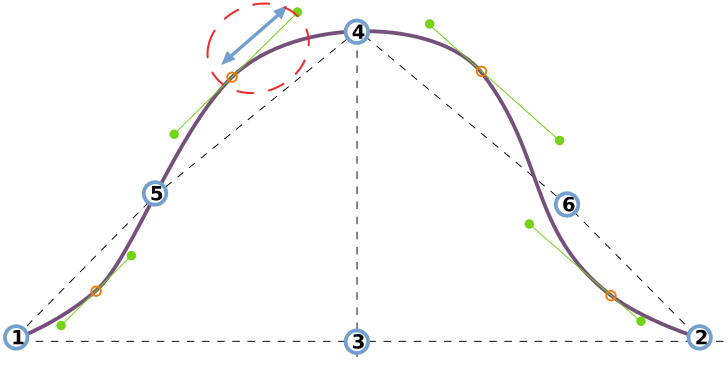
See understanding the sleevecap for an in-depth look into how the sleevecap is constructed and the influence of the different options on its shape.
Sleevecap Q3 downward spread
Controls the spread of the sleevecap third quadrant curvature towards the armhole
- Type: Percentage
- Default: 8%
- Minimum: 4%
- Maximum: 20%
This option controls the downward spread in the third quadrant of the sleevecap.
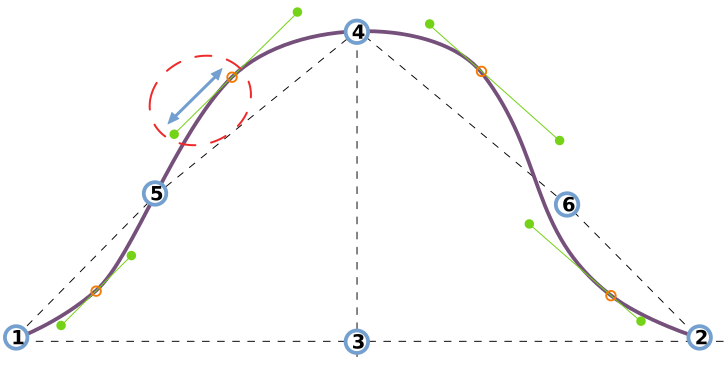
See understanding the sleevecap for an in-depth look into how the sleevecap is constructed and the influence of the different options on its shape.
Sleevecap Q4 offset
Controls the curvature of the sleevecap in the fourth quadrant (back armhole)
- Type: Percentage
- Default: 1%
- Minimum: 0%
- Maximum: 7%
This option controls the offset in the fourth quadrant of the sleevecap.
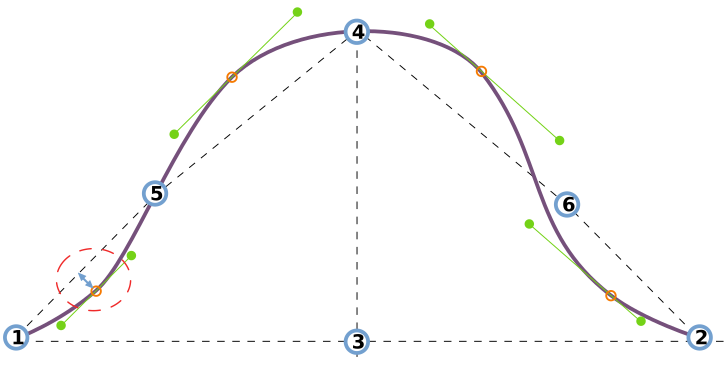
See understanding the sleevecap for an in-depth look into how the sleevecap is constructed and the influence of the different options on its shape.
Sleevecap Q4 upward spread
Controls the spread of the sleevecap fourth quadrant curvature towards the shoulder
- Type: Percentage
- Default: 7%
- Minimum: 4%
- Maximum: 20%
This option controls the upward spread in the fourth quadrant of the sleevecap.
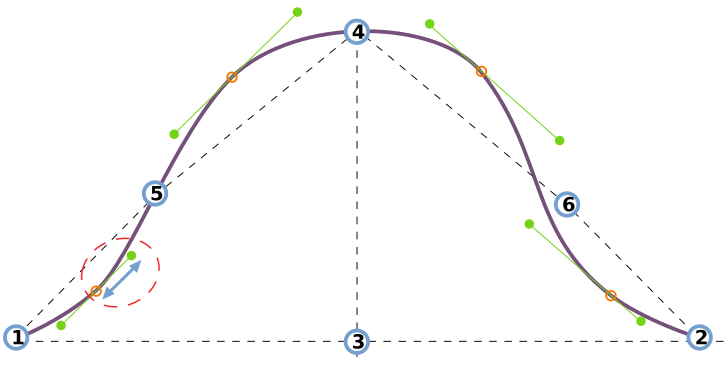
See understanding the sleevecap for an in-depth look into how the sleevecap is constructed and the influence of the different options on its shape.
Sleevecap Q4 downward spread
Controls the spread of the sleevecap fourth quadrant curvature towards the armhole
- Type: Percentage
- Default: 6.3%
- Minimum: 4%
- Maximum: 20%
This option controls the downward spread in the fourth quadrant of the sleevecap.
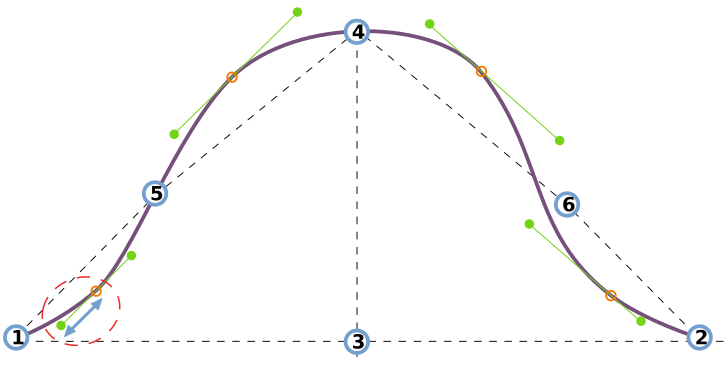
See understanding the sleevecap for an in-depth look into how the sleevecap is constructed and the influence of the different options on its shape.
Sleevecap top X
Controls the horizontal location of the sleevecap top.
- Type: Percentage
- Default: 50%
- Minimum: 25%
- Maximum: 75%
This option controls the horizontal placement of the sleevecap top.
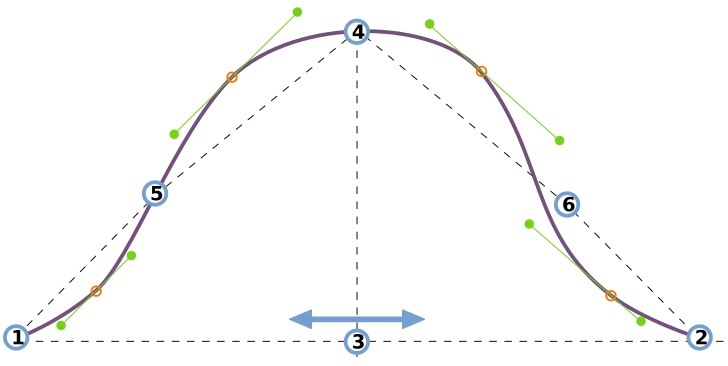
See understanding the sleevecap for an in-depth look into how the sleevecap is constructed and the influence of the different options on its shape.
Sleevecap top Y
Controls the height of the sleevecap. A higher value results in a higher and more narrow sleevecap.
- Type: Percentage
- Default: 45%
- Minimum: 35%
- Maximum: 125%
This option controls the vertical placement of the sleevecap top.
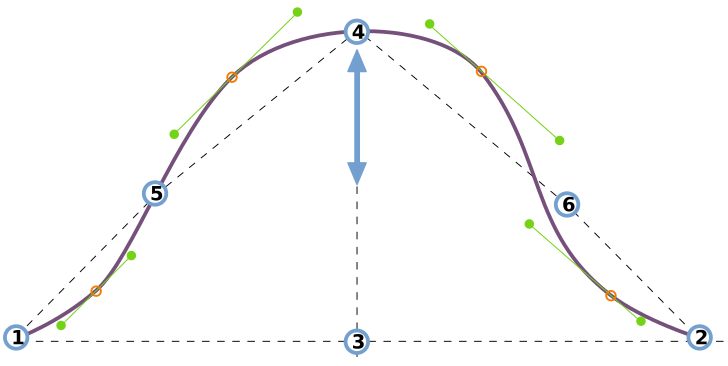
See understanding the sleevecap for an in-depth look into how the sleevecap is constructed and the influence of the different options on its shape.